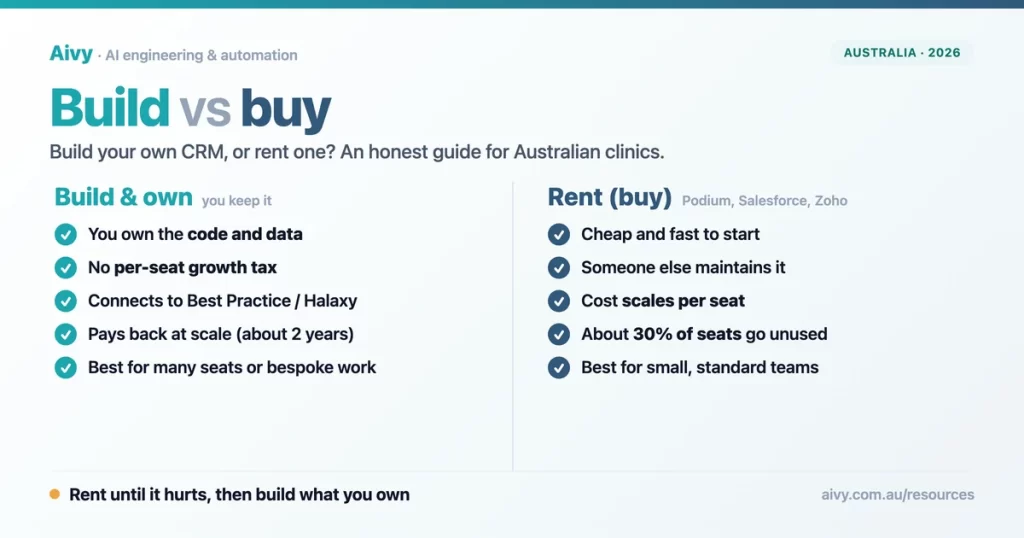
The question I get right after “which Podium alternative should we pick” is the more interesting one: should we just build our own? For years the honest answer was “almost certainly not, you are not a software company”. In 2026 that answer has changed, and not because building got trendy. It got cheaper and faster, while renting got more expensive the more your team grows. So the maths is worth doing properly rather than dismissing.
I run growth at Aivy, an AI automation agency in Melbourne, and I sit in this decision with clinics and local businesses most weeks. The temptation is to treat it as a belief (“custom is always a money pit” or “off the shelf never fits”).
It is not a belief, it is a calculation, and it turns on a handful of specific things: how many people use it, how unusual your workflow is, what it has to connect to, and how long you plan to keep paying.
This guide is the version I wish every business owner had before they either signed another subscription or sank money into a custom project that stalled. It covers what build and buy actually mean, what each really costs over time, when renting is the right call, when building wins, the six questions that settle it, why custom projects fail, and how AI moved the line. If you read only the quick pick, you have the shape of the answer.
Build your own CRM, or rent another one?
Most people arrive at this question sideways. They start by shopping for a replacement, work through the options in our guide to the best Podium alternatives in Australia, and then notice that every option is the same deal in a different shirt: a per-seat subscription you rent and never own. That realisation is the real fork in the road. One path keeps renting, just from a different vendor. The other builds the thing once and owns it.
Neither is automatically right. Renting is the correct default for a reason: it is cheap to start, fast to switch on, and the maintenance is somebody else’s job. Building is the correct answer in specific situations that are easy to name once you stop arguing about it in the abstract. The rest of this guide is about telling those situations apart, with the numbers attached rather than left to gut feel.
Verdict
Renting is the safe default. Building only wins in situations specific enough to name.
What building and buying actually mean for a clinic
Buying, in this context, means subscribing to a finished product: Podium, GoHighLevel, Salesforce, Zoho, HubSpot. You pay per user per month, you configure what the product lets you configure, and the vendor owns the software, the roadmap and ultimately your data’s home. It is renting, and renting is fine until it isn’t.
Building means a system designed around your exact workflow that you own outright: the code, the data, the deployment. For a clinic that usually means automated patient reminders and recall, a shared inbox, lead capture and reporting, connected directly to the practice-management system you already run, with no per-location contract and no vendor who can switch it off. There is a middle ground too, the no-code builders that let you assemble something yourself, but for anything a patient touches I would treat those as prototypes rather than production.
The distinction that matters is ownership. When you buy, you rent capability and accept the vendor’s limits. When you build, you carry the responsibility of maintaining it but you control it. Everything else in this decision is really about whether that control is worth the responsibility for your specific situation.
Verdict
Buying rents capability inside the vendor’s limits. Building adds maintenance, and hands you the control.
What it costs to build vs rent over time
This is where the abstract argument meets the invoice. Off-the-shelf platforms charge per seat, so the bill scales with your headcount: a Zoho enterprise plan for fifty staff runs around $32,000 a year, and Salesforce Sales Cloud at the same size sits closer to $75,000 a year. Rostering sits in the same per seat trap, and the real cost of Deputy, Tanda and Employment Hero follows the same arithmetic.
Custom is the opposite shape: a one-off build, then maintenance that typically runs 15 to 25% of the build cost a year, with no licensing and no per-seat growth tax. In Australia a custom CRM ranges from roughly $15,000 for a basic system to $75,000 or more for something substantial, with most growing businesses landing between $25,000 and 45,000.
Put those two shapes on the same five-year timeline and the picture is clear. Renting starts cheaper and keeps climbing as you add seats. Building costs more in year one, then flattens to maintenance. The crossover for a fifty-person team lands inside about two years.
At 50 users, building pays back within about two years
Illustrative cumulative cost for a 50-user team. Renting scales per seat; building is a one-off plus 15 to 25% a year maintenance. Sources: 2026 custom-CRM cost guides; Salesforce and Zoho published per-user pricing.
The honesty caveat matters as much as the chart. This shape only holds at scale. For a clinic with a handful of users, the subscription stays small and the one-off build never pays back, so renting wins comfortably. The more seats you add, and the longer you keep the system, the more building pulls ahead. That is the whole game: not “custom is cheaper”, but “custom is cheaper once you are big enough or staying long enough”, and knowing which side of that line you sit on.
When renting off the shelf is the right call
Rent if you have a handful of users, a fairly standard workflow, and a product that already connects to the systems you run. Rent if you have no in-house tech capacity and no appetite to manage a build. Rent if you need something live this week rather than in two months. For a solo practitioner or a small clinic, a well-chosen subscription is almost always the right answer, and anyone telling you to build at that size is selling you a build.
The one thing to watch, even when renting is right, is what you actually use. Across the average organisation only 54% of paid software licences actually get used, so the other 46% is money leaving the building every month for nothing.
Companies pay for SaaS seats nobody uses
Share of SaaS licences in the average organisation, axis 0 to 100%. Source: Zylo, SaaS licence utilisation.
So rent, but rent well: right-size your seat count, review it quarterly, and drop the tools you stopped opening. The trap is not renting, it is renting on autopilot. In my experience with Australian SMBs, the single fastest saving available is not switching platforms at all, it is cancelling the seats and tools nobody has logged into since onboarding.
When building and owning wins
Build when the per-seat bill has become a real number and is still growing, because that is the cost the one-off build replaces. Build when your workflow is genuinely unusual and you are paying to bend a product that was never shaped for you. An NDIS provider billing hundreds of support items, each priced by time of day and region, is a typical case of the second.
Build when the thing you most need is an integration that does not exist, which is the common case for Australian clinics: most off-the-shelf platforms have no native link to Best Practice, Halaxy or Cliniko, so you are stuck doing manual exports forever no matter which subscription you pick.
That integration gap is the reason building so often wins in healthcare specifically. A platform you own can connect straight to your practice-management system and run the patient reminders, recall and reporting off live data, instead of a person re-uploading a CSV every morning. Build also wins when you have a competent team or partner to maintain it and a multi-year horizon, because ownership compounds: every year you would have paid a rising subscription, you instead pay maintenance on an asset that is yours.
Verdict
Many seats, an unusual workflow, or no native link to your practice-management system: any one tips it.
Build vs buy: six questions before you decide
You do not need a consultant to make this call. You need six honest answers. Score them, and the direction is usually obvious within a minute. If most of your answers fall in the left column, rent. If most fall in the right, building deserves a proper costing.
| The question | Lean to buy (rent) | Lean to build (own) |
|---|---|---|
| How many people will use it? | A handful of seats | Many seats, and growing |
| How standard is your workflow? | Standard, common process | Unusual, specific to how you work |
| Does it connect to your AU systems? | An off-the-shelf connector exists | No native link to Best Practice, Halaxy or Cliniko |
| Do you have tech capacity? | No team or partner to maintain it | A competent team or partner you trust |
| How fast do you need it? | You need it this week | You can wait four to eight weeks |
| What budget shape suits you? | Small, predictable monthly | A one-off now, lower cost later |
The questions are deliberately blunt because the decision is. The most common mistake I see is a small business talking itself into a build it does not need, and the second most common is a fifty-seat operation paying a six-figure subscription tax for years because nobody ever ran the comparison. Both are avoidable with the table above and a calculator.
Why custom CRM builds fail, and how to de-risk yours
Here is the part the people selling builds skip. Most software projects do not go to plan. Across decades of data, only about a third fully succeed, half come in late or over budget or with the scope cut, and roughly one in five are cancelled or quietly never used.
Only 31% of software projects fully succeed
Share of software projects by outcome, axis 0 to 100%. Source: Standish Group CHAOS Report 2020.
It gets sharper at the top end. Research by McKinsey with the University of Oxford, across more than 5,400 large IT projects, found they run on average 45% over budget while delivering 56% less value than promised, and that 17% go so badly they threaten the existence of the organisation that started them.
This is the “ghost build” risk, and it is real. I have spoken with an Australian clinic group that got most of the way through a custom system, hit a mid-project pivot, and abandoned the whole thing. That ghost votes against every future build unless you name it.
The good news is that builds fail for predictable reasons, which means they can be de-risked. They fail from scope creep, from having no single owner, and from a big-bang launch that bets everything on one go-live. So do the opposite. Start with a small, sharply scoped first version that does one valuable thing. Give it one owner who can say no.
Ship in phases so each step earns the next. Fix the scope and the price before you start. And pick a partner who has delivered this kind of system before, not one learning on your money. None of that removes the risk, but it moves you from the failing column toward the succeeding one.
How AI changed the build vs buy maths
The reason this decision is even worth re-running in 2026 is that AI has compressed the build. In a controlled study, developers using an AI coding assistant finished the same defined task 55% faster than those without one, in well under half the time.
AI cut the same coding task by 55%
Time to finish one defined coding task, controlled study. Bars scaled to the slower run. Source: GitHub / arXiv 2302.06590, 2023. Isolated task, not a whole project.
Read that honestly: the 55% is for an isolated, well-defined coding task, not a whole project, and a skilled team still has to design, test and ship the thing. AI does not turn a non-engineer into a software company.
What it does is take the grunt work out of the parts that used to make custom builds slow and expensive, which pulls the timeline from many months toward a few weeks and the price from six figures toward the $25,000 to 45,000 band for a focused system. That is the real shift: work that used to need a six-month engagement and only made sense for enterprise is now viable for a mid-sized clinic.
If you want the AI side of that explained on its own, our guide to AI agents and assistants goes deeper. The practical effect is that the rent-versus-build line has moved earlier, so businesses that were correctly told “just rent” two years ago are worth a fresh look today.
What you actually own at the end
When you rent, at the end of every year you have a stack of receipts and a vendor who still owns your software, sets your price, and can change either. When you build, at the end you have an asset: the code, the data, the deployment, all yours, with no per-seat tax and no one who can switch it off.
That difference does not show up in a monthly cost comparison, which is exactly why it gets undervalued until the day you try to leave a platform and discover how hard it is to take your data with you.
Ownership also fixes the quiet leak from the renting chart earlier. You stop paying for seats nobody uses, because there are no seats, only a system your whole team shares. For a regulated Australian clinic there is a compliance angle too: a platform you own can keep patient data on Australian infrastructure by design, rather than wherever a US vendor decides to host it. None of this makes building the right answer for everyone. It makes ownership a real line item that belongs in the decision, not a vague nice-to-have.
Verdict
Renting leaves receipts. Building leaves an asset, plus a say in where patient data lives.
Frequently asked questions
Is it cheaper to build or buy a CRM?
It depends on scale and time. Buying is cheaper to start and for small teams. Building costs more upfront but stops scaling with headcount, so for larger teams kept several years it usually works out cheaper. The crossover for a fifty-person team lands within about two years.
How much does it cost to build a custom CRM in Australia?
In 2026 a custom CRM in Australia ranges from roughly $15,000 for a basic system to $75,000 or more for a substantial one, with most growing businesses spending between $25,000 and 45,000. Maintenance then typically runs 15 to 25% of the build cost a year, with no licensing fees.
How long does it take to build a custom CRM?
A focused first version now takes weeks rather than months, helped by AI tooling that compresses the build. A basic system often lands in two to four months; a narrow, well-scoped first release can be faster. Big, all-at-once builds are the ones that run long, which is why phased delivery is safer.
Should a small business build its own CRM?
Usually no. With a handful of users and a standard workflow, an off-the-shelf subscription is cheaper, faster and lower risk. Building starts to make sense once you have many seats, a workflow no product fits, or an integration that does not exist off the shelf.
What is the biggest risk of building custom software?
That it never ships or ships late. Only about a third of software projects fully succeed; large ones run 45% over budget on average. The risk is real but predictable, and it drops sharply with tight scope, a single owner, phased delivery and an experienced partner.
Can AI build a CRM for me?
Not on its own. AI makes a skilled team much faster on the coding, which is why custom builds are cheaper and quicker than they were, but a person still has to design, test and ship it safely. AI lowers the cost of building well; it does not remove the need to build well.
Do I own the code if I pay someone to build my CRM?
You should, but only if your contract says so. Insist on ownership of the code, the data and the deployment in writing, plus an export and handover clause. Without that you can end up renting a “custom” system, which is the worst of both worlds.
Where the build vs buy line really sits
The build versus buy decision is not a matter of taste, and it is not “custom good, subscription bad” or the reverse. It is a line, and the line sits where your per-seat cost, your need for a workflow no product fits, and your appetite to own the thing outweigh the simplicity and low entry price of renting. For most small businesses that line is comfortably on the rent side. For a growing multi-site operation paying a rising subscription tax, it has usually crossed.
Bottom line
Small and standard: rent. Growing, multi-site, paying a rising per-seat bill: cost the build.
The Australian clinic group I mentioned earlier is the cautionary half of the story: they built, stalled, and abandoned it, which made them gun-shy about ever building again. The lesson was not “never build”, it was “never build big-bang”. When we look at the same situation now, the answer is a small, owned first version connected to their real systems, shipped in phases, costed and de-risked up front. That is a different proposition to the one that burned them, and AI is a big part of why.
So before you sign the next subscription or greenlight the next build, run the six questions and the maths. If renting fits, our Podium alternatives guide gives you the shortlist.
If the line has crossed and you want to talk through what an owned, AU-hosted platform would actually cost and how to ship it without the ghost-build risk, you can book a chat with the Aivy team. We do not resell software, so we have no stake in which way you go.
Last updated 11 August 2026. Costs, pricing and study figures change over time; verify current numbers before deciding.
Sources
Standish Group, CHAOS Report (2020): software project outcomes (31% successful, 50% challenged, 19% failed). Used in the project-outcomes chart.
McKinsey and University of Oxford: large IT projects run 45% over budget and deliver 56% less value on average; 17% threaten the organisation. Referenced in the ghost-build section.
GitHub / arXiv 2302.06590 (2023): developers with an AI assistant finished a defined coding task 55% faster (1h11m vs 2h41m). Used in the AI speed chart.
Zylo, how much is wasted on SaaS spend: the average organisation uses only 54% of its SaaS licences, leaving 46% wasted. Used in the SaaS waste chart.
2026 custom-CRM development cost guides plus Salesforce and Zoho published per-user pricing: AU build ranges ($15k to 75k+), maintenance 15 to 25% a year, and the off-the-shelf per-seat figures. Used in the cost chart.