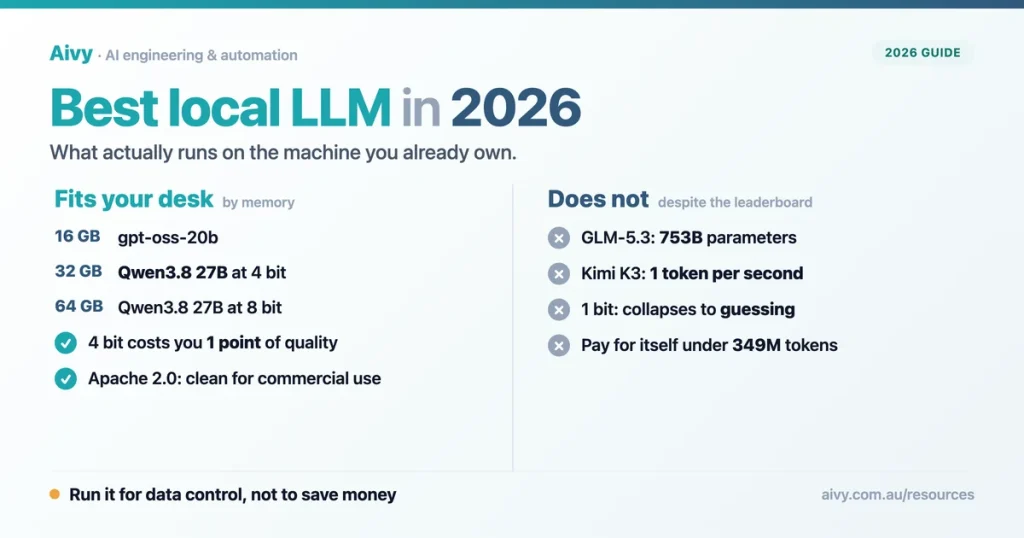
Every few weeks a client asks me the same question in a slightly different way. Can we run one of these models ourselves, on our own machine, so the data never leaves the building? It is a fair question, and the answer has changed a lot in the last year. What has not changed is the quality of the advice available online, which is mostly a list of model names with no relationship to the hardware sitting under anyone’s desk.
I run editorial at Aivy, an AI automation agency in Melbourne, and I spend a lot of time between the vendor claim and the client budget. The gap on this topic is unusually wide. The models topping the open weights leaderboard right now have 753 billion and 2.8 trillion parameters. No Australian small business is running those. The interesting question is not which open model is best, it is which good open model fits in the memory you can actually buy.
So this guide is organised around that constraint. Memory first, then quality, then the licence, then the money, and finally the honest list of what a local model still cannot do. The charts are the part I wish someone had handed me two years ago, and they build on what we reported when local AI reached Australian small businesses. If you read only the quick pick, you will still leave with the structural answer.
The best local LLM options in 2026 at a glance
Four models are worth your attention if the machine is yours. They are the ones that combine a decent intelligence score, a size that fits real hardware, and a licence that lets you use the output commercially without a phone call. Everything else on the leaderboard is either too large for a business machine or comes with terms you would want reviewed. The same discipline applies to hosted families, as we set out when choosing which Claude model suits which job.
The memory figures below are the honest ones: model weights plus a working key value cache, not the marketing number. I have used the 4 bit footprint because that is what nearly everyone actually runs, for reasons the quantisation section explains.
| Model | Size | Intelligence | Context | Licence |
|---|---|---|---|---|
| Qwen3.8 27B | 27B dense | 34 | 262k | Apache 2.0 |
| Muse Glimmer | 30B dense | 18 | 131k | Apache 2.0 |
| gpt-oss-120b | 117B, 5.1B active | 12 | 131k | Apache 2.0 |
| gpt-oss-20b | 21B, 3.6B active | Not rated | 131k | Apache 2.0 |
Intelligence Index scores from Artificial Analysis, checked 9 September 2026. Licences from each model’s own repository.
The open weights leaderboard is not a list of what you can run
Understand this before you start shopping. The top of the open weights table is dominated by models that are open in the licensing sense and out of practical reach. GLM 5.3 has 753 billion parameters and Kimi K3 has 2.8 trillion: open the way a container ship is for sale. The frontier models we compared in GPT 6 Astra against Claude Fable 5.1 run in data centres, not offices.
The newest leader proves it. Moonshot’s Kimi K3.1 Pro now tops the chart at 55, but it is a 3T class model with weights due by 4 November. Further down, Qwen3.8 27B scores 34, ahead of a 428 billion and a 550 billion parameter model at a twentieth of their size. That is the whole argument for the smaller dense models.
Open weights models by Intelligence Index
Higher is better, axis 0 to 100. Teal is the model that fits a business machine. Source: Artificial Analysis, 9 September 2026, and 23 October 2026 for Kimi K3.1 Pro, whose weights are due by 4 November.

There is a demonstration of the limit that made the rounds recently. An engineer got the full Kimi K3 running on a MacBook Pro by streaming the expert weights off four SSDs. It works, at about one token per second, so a single paragraph takes a minute. It is a beautiful hack and a useless business tool, and it marks the boundary precisely.
Memory is the real constraint, not the model
Once you accept the shortlist, the question becomes arithmetic. A model needs enough memory to hold its weights plus a key value cache that grows with the length of the conversation. For Qwen3.8 27B the cache runs at roughly 2.3 GB for every 32,000 tokens of context, which is easy to forget and painful to discover.
That is why the table below is built around machines rather than models. In my experience this is the step where most local deployments quietly fail. Somebody checks that the model file is 17 GB, sees 16 GB of memory in the laptop, and assumes it will be fine. It will not be fine, because the operating system needs several gigabytes and the cache needs several more. This is the sort of sizing we work through with Melbourne automation clients before anything gets bought.
| Your machine | What runs well | What to expect |
|---|---|---|
| 16 GB | gpt-oss-20b | Usable for drafting and extraction. Qwen3.8 27B at 4 bit does not fit once the cache grows. |
| 32 GB | Qwen3.8 27B at 4 bit | The sweet spot. 17 GB of weights, room for a long context and the rest of your work. |
| 64 GB | Qwen3.8 27B at 8 bit | 29 GB of weights. Stop worrying about quantisation loss entirely. |
| 96 GB and up | Qwen3.8 27B at full precision | 55 GB of weights. Diminishing returns over 8 bit for most business work. |
Weight sizes measured by Quesma, September 2026. Cache overhead approximately 2.3 GB per 32k tokens.
For Australian buyers the hardware maths is unusually simple this month. A Mac mini starts at $1,449 with 16 GB, and the M5 Pro version starts at $2,699 with 24 GB and configures up to 64 GB. A 32 GB machine, which is the configuration I would actually recommend, sits between those two. If you are weighing that spend against a subscription, our guide to what AI work really costs in Australia puts it in context.
Quantisation: where quality holds and where it collapses
Quantisation is the compression that makes any of this possible. Instead of storing each weight at full precision, you store it with fewer bits. The file shrinks, the memory requirement shrinks, and at some point the model stops being able to think. The useful question is where that point sits, and until recently the honest answer was that nobody had measured it carefully. It matters most for agent work, which we unpack in agentic AI against generative AI.
Somebody has now. A benchmark run published this month tested Qwen3.8 27B at five levels of compression on graduate level science questions and on agentic coding tasks. The result is clean enough to act on, and it saves you a lot of experimenting.
Qwen3.8 27B on GPQA Diamond, by compression level
Higher is better, axis 0 to 100. Orange marks the level where the model stops working. Source: Quesma quantisation benchmark, 8 September 2026.
The shape of that chart is the practical lesson. Cutting the model from 55 GB to 17 GB costs you one point on a hard science benchmark. On agentic coding the 4 bit version scored the same 77% as the full precision model. Going one step further to 2 bit costs a little more, dropping coding to 70%. Then the floor gives way: at 1 bit the model scores around 50%, which on a four option test is guessing.
So the decision rule is short. Use 4 bit unless you have the memory to spare, in which case use 8 bit. Never use 1 bit for anything you care about, no matter how appealing a 6.2 GB file looks when you are short of space.
What each compression level costs you in disk and memory
Model weights only, before the key value cache. Source: Quesma quantisation benchmark, 8 September 2026.
Licences: the part that decides whether you can ship it
Here is where the phrase open source does the most damage. These models are not all under the same terms, and two of the highest scoring ones are not under a standard open licence at all. If you are building something a customer will pay for, this table matters more than any benchmark on the page.
Apache 2.0 and MIT are the two you want. Both allow commercial use, modification and redistribution with no royalty and no user cap. A custom vendor licence is not automatically a problem, but it is a document somebody has to read before you build on it. For professional services firms that pass work to clients, this is the row that matters.
| Model | Licence | Commercial use | What to check |
|---|---|---|---|
| Qwen3.8 27B | Apache 2.0 | Yes, unrestricted | Attribution on redistribution |
| gpt-oss (both sizes) | Apache 2.0 | Yes, unrestricted | A usage policy sits alongside the licence |
| Muse Glimmer | Apache 2.0 | Yes, unrestricted | Meta’s usage policy still applies |
| DeepSeek V4 Pro | MIT | Yes, unrestricted | Too large for a business machine |
| GLM-5.3 | Custom vendor licence | Read it first | Not a standard open licence despite the label |
| Kimi K3.1 Pro | Not announced yet | Wait for the licence | Weights due by 4 November 2026, and far too large for a business machine |
Licence terms read from each model’s own repository, 9 September 2026, and from Moonshot’s announcement for Kimi K3.1 Pro, 23 October 2026. This is general information, not legal advice.
Note what the last two rows do to the leaderboard. GLM 5.3, which led the open weights ranking in September, ships under its own bespoke terms, and Kimi K3.1 Pro, which leads it now, has no licence named yet. Calling either open source without qualification ends in an awkward conversation. If your business handles regulated information, our Privacy Act compliance playbook covers the obligations that sit underneath any of this.
What running it yourself actually costs
This is the section most guides skip, and it is the one that changes decisions. The pitch for local models is usually framed as saving money on subscriptions. When you do the arithmetic against Australian hardware prices, that framing falls apart for almost everyone. It is the first thing we check in an AI consulting engagement.
Qwen3.8 27B through a hosted API costs about $0.69 per million tokens of input and $4.15 per million tokens of output. A Mac mini that can run it well is a one time $1,449 and up. Divide one by the other and you get the break even point: roughly 349 million tokens of output before the hardware pays for itself.
Annual cost: hosted API against buying the machine
API rate converted from published USD pricing at 1 AUD = 0.7232 USD, Reserve Bank of Australia, 9 September 2026. Hardware price from Apple Australia. Electricity and setup time not included.
Read that chart honestly and it tells you something uncomfortable for the local model enthusiasts. At light and steady volumes the hosted API is not merely cheaper, it is cheaper by an order of magnitude. The hardware only wins if you are pushing half a billion tokens a year, and even then the margin is thin once you count electricity and the afternoon somebody spends configuring it.
Which means the case for running your own model is not financial. It is about where the data sits. That is a real reason, and often a sufficient one, but it should be stated plainly rather than dressed up as a saving. If you stay in the cloud instead, your data still lands in a physical building, and where Australia’s data centres actually are is worth knowing before you pick a region.
Run a local model when the data cannot leave your control: client files, health records, legal documents, anything covered by a confidentiality clause you have signed. Do not run one to save money on a subscription. The arithmetic does not support it below very high volume, and the hosted option keeps improving while your hardware does not.
Speed: the number that decides whether anyone uses it
A model that produces text slower than a person reads will not survive contact with your team. This is the failure I have seen most often: the pilot works, the security review passes, and then everybody goes back to the browser tab because waiting is unbearable. We saw the same pattern comparing Claude Code against Codex.
For reference, the hosted version of Qwen3.8 27B produces about 46 tokens per second with a first token arriving in under four seconds. That is comfortably faster than reading speed. A well configured local copy on a modern machine lands in the same neighbourhood, which is why the 27B size is the practical ceiling for most desks. The Kimi K3 experiment mentioned earlier sits at one token per second, roughly fifty times slower, and that is the difference between a tool and a demonstration.
If your use case is batch work that runs overnight, speed matters less and you can be more ambitious. If a person is waiting for the answer, treat anything under about 20 tokens per second as unusable and plan the hardware accordingly. The same logic applies when choosing any assistant, which we go through in our comparison of the best AI coding assistants for Australian teams.
What a local model still cannot do
Being straight about the limits is the fastest way to work out whether this is for you. The gap between a 27B model on your desk and a frontier model in a data centre is real, and no amount of configuration closes it. Some of that gap matters for your work and some of it does not. Firms handling privileged material, such as the practices in our guide to AI tools for Australian lawyers, tend to feel it least.
| Limit | Does it matter for you? |
|---|---|
| Roughly half the intelligence score of a frontier model | Yes for open ended research and hard reasoning. No for extraction, summarising, drafting and classification. |
| No live web access unless you build it | Yes if you need current information. This is the most common surprise. |
| You own the maintenance | Yes. Updates, quantisation choices and breakage are now your job, not a vendor’s. |
| Context fills faster than you expect | Yes on long documents. Every 32k tokens costs another 2.3 GB of memory. |
| Weaker at niche Australian context | Sometimes. Local regulation, ATO detail and Australian legal specifics are thinner in these models. |
None of those are reasons to avoid a local model. They are reasons to scope it properly. The teams that succeed with this give the local model the repetitive, sensitive, well defined work, and keep a hosted model for the open ended thinking. That split is much easier to sell internally than an all or nothing migration, and it is the pattern behind most of the document automation work we do.
Which local model should an Australian business run
Three decision rules cover almost every situation I encounter, and they are all about your constraint rather than the leaderboard.
Choose Qwen3.8 27B if you have 32 GB or more and you want the best quality that fits. Run it at 4 bit. It is the highest scoring model on the shortlist, the licence is clean, and the quantisation evidence says you lose almost nothing. This is the default for most businesses and the one I would start with.
Choose gpt-oss-20b if you are working with 16 GB, which describes most laptops issued in the last three years. It is designed to fit that budget and it is under the same permissive licence. Expect less on hard reasoning, and scope the work accordingly.
Choose a hosted model instead if your data is not actually sensitive. That is the most common honest answer, and if the driver is data residency rather than secrecy, several hosted options already keep information in Australia. We list them in our guide to which AI tools keep your data in Australia, which is the piece to read before you buy any hardware at all.
If you want to go further than a single model and run an agent locally, our guide to OpenClaw covers the framework side of the same problem.
And if you are still weighing this against the commercial options rather than replacing them, Claude against ChatGPT is the natural next read.
Frequently asked questions about the best local LLM
What is the best local LLM in 2026?
For most machines, Qwen3.8 27B at 4 bit quantisation. It scores 34 on the Artificial Analysis Intelligence Index, ships under Apache 2.0, and needs about 17 GB for weights, so it fits a 32 GB computer with room for context.
Can I run a local LLM on 16 GB of RAM?
Yes, but your realistic choice is gpt-oss-20b, which was designed for that budget. Qwen3.8 27B at 4 bit needs 17 GB for weights alone, before the operating system and the key value cache, so it does not fit reliably.
Does quantisation make a local model worse?
Barely, until it suddenly does. Dropping from full precision to 4 bit costs about one point on a hard science benchmark and nothing measurable on agentic coding. At 1 bit the same model falls to roughly random guessing.
Is running an LLM locally cheaper than paying for an API?
Usually not. At current rates a $1,449 machine needs around 349 million tokens of output to break even against hosted pricing. Below very high volume the hosted option typically costs less, so choose local for data control instead.
Which local LLM is best for coding?
Qwen3.8 27B is the strongest of the models that fit ordinary hardware, scoring about 77% on an agentic coding benchmark at both full precision and 4 bit. Frontier hosted models still lead, so weigh the gap against your privacy requirement.
Are open weights models free for commercial use?
Often, but not always, and the label is unreliable. Qwen3.8, gpt-oss and Muse Glimmer are Apache 2.0 and DeepSeek V4 is MIT, all fine commercially. GLM-5.3 ships under a custom vendor licence that needs reading first.
Do I need a developer to run a local model?
Not for a basic setup. Current desktop tools install a model in a few clicks. You will want technical help for connecting it to business systems, choosing quantisation and keeping it maintained over time.
Will a local model keep my data private?
It keeps data on your hardware, which removes the third party processing question. That is a genuine advantage, though your other obligations around storage, access control and retention under Australian privacy law still apply.
The bottom line for Australian businesses in 2026
The useful reframing is that this is a hardware decision wearing a software costume. Once you know how much memory you have, the shortlist writes itself: 16 GB points at gpt-oss-20b, 32 GB points at Qwen3.8 27B at 4 bit, and anything larger just makes that same model more comfortable. The leaderboard is interesting reading and a poor shopping list. Apple’s assistant follows the same rule: Siri AI keeps its best on device model for recent iPhones.
A Melbourne firm I spoke with this year went through this properly. They assumed local meant cheaper, priced the machine, then realised their actual volume made the hosted option a tenth of the cost. They still went local, because their client agreements made third party processing awkward. That was the right call for the right reason, and it only became clear once they separated the privacy argument from the money argument. We see that split across every industry we work in.
If you are weighing this up and want a second opinion before spending on hardware, that is a conversation we have often. We are Aivy, an AI and automation team working with Australian businesses, and we are happy to look at your volumes and your obligations with you. You can book a short call and we will tell you honestly which side of the line you fall on.
Last updated: 24 October 2026
Sources
Artificial Analysis, open weights model comparison. Intelligence Index scores, parameter counts, context windows, hosted pricing and output speed for every model named in this article. Checked 9 September 2026.
Artificial Analysis, reading of 23 October 2026. Kimi K3.1 Pro at 55.1 on the Intelligence Index v4.3, read through the Artificial Analysis API. Based on data from Artificial Analysis, which does not endorse Aivy, this article or the conclusions drawn from its data.
Moonshot AI, Kimi K3.1 Pro announcement. A 3T class open weight model with a 1 million token context window, full weights due by 4 November 2026 and no licence stated. Read 23 October 2026.
Quesma, Qwen3.8 27B quantisation benchmark. weight sizes at each compression level, GPQA Diamond and Terminal-Bench 2.1 scores, and the key value cache figure of approximately 2.3 GB per 32k tokens. Published 8 September 2026.
Qwen3.8 27B model repository. Apache 2.0 licence, 27 billion parameters and the 262,144 token native context window.
Reserve Bank of Australia, exchange rates. all US dollar pricing converted at 1 AUD = 0.7232 USD, 9 September 2026. Hardware prices from Apple Australia on the same date.