GitHub Copilot passed 4.7 million paying subscribers, up about 75% year on year, on the Microsoft earnings call for the second quarter of FY2026 in January 2026. Cursor says more than 50,000 enterprises now build with it, including 64% of the Fortune 500. AI coding assistants are now standard for professional developers, with GitHub research showing Copilot users wrote code 55% faster on a single benchmark task back in 2022.
Two tools lead the market: Cursor, a full AI powered IDE built on VS Code, and GitHub Copilot, the extension that works across multiple editors. Both promise to boost productivity, but they take different approaches, and since August they also sit with very different owners: Microsoft’s GitHub on one side and SpaceX, which also owns X and Grok, on the other.
This comparison breaks down features, models, pricing in Australian dollars and real world performance to help you decide which fits your development workflow. It also covers what changed over the past few months, from Cursor’s new X Subscription plans to Copilot’s switch to GitHub AI Credits, because a comparison written before September describes tools that no longer exist in that form.

Cursor vs GitHub Copilot at a glance
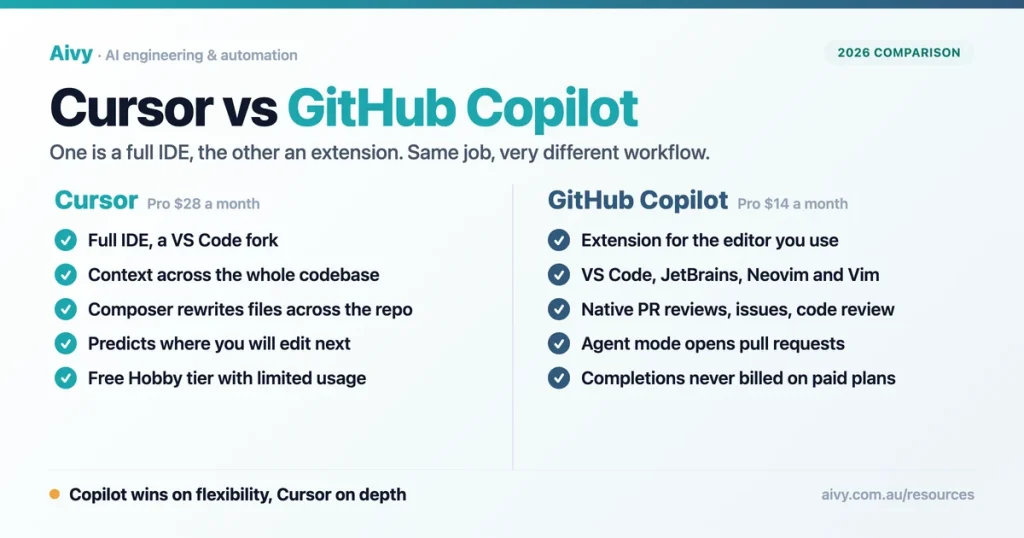
The key differences come down to architecture and approach. Cursor is a full IDE built around AI from the ground up. GitHub Copilot is an extension layered onto your existing editor. Here is how they compare across the most important dimensions.
| Aspect | Cursor | GitHub Copilot |
|---|---|---|
| Type | Full IDE (VS Code fork) | Extension/plugin |
| Base editor | Cursor only | VS Code, JetBrains, Neovim, Vim |
| AI models (see update note) | Grok 4.7 and Composer 2.5 included; Claude, GPT 5.6 and Gemini at API list price | More than thirty, including Claude Opus 5.5, GPT 6.1 Sol, Gemini 4 Argon and Grok 4.7 |
| Project context | Entire codebase | Open files and imports |
| Free tier | Yes (limited) | Yes (limited chat and agent usage) |
| Main paid plan | Premium $43.18/month (Plus $11.52, own models only) | Pro $14.39/month |
| GitHub integration | Basic | Native (PRs, reviews, issues) |
| Best for | AI first development | Adding AI to existing workflow |
| Category | Winner | Why |
|---|---|---|
| Code completion | Cursor | Project wide context, predicts next edit |
| IDE flexibility | Copilot | Works in VS Code, JetBrains, Neovim, Vim |
| Agent features | Cursor | Composer is more mature and reliable |
| GitHub workflow | Copilot | Native PR reviews, issues, code review |
| Pricing value | Copilot | $14.39/mo vs $43.18/mo for Cursor Premium |
| Model variety | Copilot | More than thirty models inside its credits |
Cursor’s VS Code foundation means the interface feels familiar to most developers. Settings, themes and keybindings transfer directly, though extensions install from Open VSX rather than the VS Code Marketplace. GitHub Copilot’s strength is flexibility. If your team uses JetBrains IDEs or you switch between different editors, Copilot works everywhere without changing your environment.
AI models: Cursor vs GitHub Copilot compared
The AI models powering these tools shape what they can do, and both now offer several, but on very different terms. Model line ups also turn over fast: GPT 4o, Claude 3.5 Sonnet and the o1 reasoning models have all been retired from both tools, so any comparison written before mid 2026 describes a menu that no longer exists.
| Model | Cursor | GitHub Copilot | Best for |
|---|---|---|---|
| Claude Opus 5 | Legacy; Cursor now lists Opus 5.5 | ✅ Pro+ and above | Complex multi step refactors |
| Claude Sonnet 5 | Legacy; Cursor now lists Sonnet 5.5 | ✅ All paid plans | Everyday coding at lower cost |
| Claude Opus 5.5 | ✅ Premium and above, at API list price | ✅ Listed | Anthropic’s suggested starting point since 22 September 2026 |
| GPT 5.6 (Sol, Terra, Luna) | ✅ Premium and above, at API list price | ✅ Included | Three price points, now below GPT 6 Astra |
| GPT 6 Sol, GPT 6.1 Sol and GPT 6 Luna | ❌ Not in Cursor’s model list | ✅ All three listed | Separate models from GPT 5.6, released 22 September 2026; GPT 6.1 Sol on 29 September |
| Gemini 3.1 Pro | ✅ Premium and above, at API list price | ❌ Not listed (Gemini 3.8 Flash and 4 Argon are) | Long context and UI work from mockups |
| Gemini 4 Argon | ✅ Premium and above, at API list price | ✅ Listed | Generally available since 13 October 2026 |
| Grok 4.5 | ✅ Included; Grok 4.7 (21 September) now leads | ✅ Added July 2026 | Trained by Cursor with SpaceXAI |
| Composer 2.5 | ✅ Cursor only | ❌ Not available | Cursor’s own agent model |
Cursor’s own models, Grok 4.7 (released on 21 September), Grok 4.6, Grok 4.5 and Composer 2.5, sit inside every paid plan’s weekly usage pool. Claude and Gemini models and the GPT 5.6 family are available from the Premium plan up, billed at API list price from prepaid credit, while Plus covers Cursor’s own models only.
GitHub Copilot has expanded well beyond OpenAI models and now lists more than thirty, from Claude Opus 5.5 and GPT 6.1 Sol to Gemini 4 Argon, Grok 4.7 and the open weight Kimi K3, all drawing on the plan’s GitHub AI Credits. GitHub says Pro gets a selection of models, and Pro+ and above get the premium ones.
- Anthropic: Claude Fable 5.1 and Claude Mythos 5.1 arrived on 1 September 2026 and Fable 5 moved to the legacy list; on 22 September Claude Opus 5.5 arrived at $5.76 and $28.79 per million tokens, and Claude Opus 5 joined the legacy list. Anthropic’s documentation starts most workloads on Opus 5.5 and keeps Fable 5.1 for demanding reasoning and long agentic runs, or jobs Opus 5.5 cannot finish at higher effort.
- OpenAI: GPT 6 Sol and GPT 6 Luna arrived on 22 September 2026, at $2.88 and $14.39 per million tokens for Sol and $0.14 and $0.72 for Luna. OpenAI positions Sol for complex coding and agentic workflows and Luna as its most efficient model for focused, high volume tasks. There is no GPT 6 Terra, and GPT 6.1 Sol followed on 29 September at the same price.
- Google: Gemini 4 Argon, announced on 30 September, has been generally available since 13 October at an introductory $2.88 and $14.39 per million tokens until 30 November, then $5.76 and $28.79. Google says it scores 77.9 per cent on DeepSWE v1.1.
- Argon has not moved Anthropic’s starting point; we set out how Opus 5.5 and Argon compare at the same effort.
- For a deeper comparison of these models, see our guide on Claude vs ChatGPT.

Code completion in Cursor vs Copilot
Inline code suggestions are the most used feature in both tools. This is what you interact with dozens of times every day while writing code. The differences here matter most to daily experience.
| Feature | Cursor | GitHub Copilot |
|---|---|---|
| Single line completion | ✅ | ✅ |
| Multi line completion | ✅ (Tab) | ✅ |
| Auto import | ✅ TypeScript, Python | ✅ |
| Context awareness | Project wide | Open files |
| Cursor prediction | ✅ Predicts next edit location | ❌ |
| Free tier limit | Limited completions | 2,000 completions a month and a small AI credit allowance |
| Paid tier limit | Unlimited (Pro) | Unlimited (Pro) |
Cursor’s Tab completion analyses your entire project structure. When suggesting code, it considers files you haven’t opened, understanding relationships between components. The cursor prediction feature guesses where you’ll edit next and prepares suggestions in advance.
GitHub Copilot focuses on the current file and open tabs, reading imports, function signatures and comments to generate relevant suggestions. The quality is excellent for line by line coding, though it may miss project wide patterns that Cursor catches. Both tools auto import symbols in TypeScript and Python, adding import statements when you accept suggestions.
Agent mode: Cursor Composer vs GitHub Copilot
Both tools go beyond simple completions with conversational AI and autonomous agents that can modify multiple files at once. This is where the tools diverge most sharply in capability and approach.
| Feature | Cursor | GitHub Copilot |
|---|---|---|
| Chat interface | ✅ ⌘+L | ✅ Sidebar panel |
| Context from files | ✅ Drag folders, @symbols | ✅ #files, attach context |
| Image support | ✅ | ✅ |
| Apply suggestions | ✅ Direct apply | ✅ Direct apply |
| Agent mode | ✅ Composer with ⌘. | ✅ Agent mode in IDE |
| Multi file edits | ✅ Native in Composer | ✅ Edits feature |
| Terminal commands | ✅ Agent runs commands | ✅ CLI and terminal |
| Code review | ✅ Bug finder (paid per click) | ✅ PR reviews on GitHub |
Cursor’s Composer is the standout feature. Press ⌘+. to activate agent mode, where the AI takes control of your editor. It searches across your codebase, runs terminal commands, creates and modifies files, and handles entire features on its own. The agent understands project structure and can refactor across dozens of files.
- GitHub Copilot’s agent mode works similarly but feels more recent: you can assign issues directly to Copilot, and it creates pull requests with the code changes.
- The Edits feature allows multi file modifications, though users report occasional slowness with larger projects.
- The native GitHub integration means PR reviews happen in your repository, and in the Pro+ tier Copilot supports third party agents like Claude from Anthropic and OpenAI Codex, so you can use specialised agents for specific tasks.

IDE support: where Cursor and Copilot work
Your choice may depend on which editors your team already uses. Cursor requires switching to a new IDE: built on VS Code, the move is smooth for VS Code users, with themes and keybindings transferring and most popular extensions on Open VSX, though not Microsoft’s. In JetBrains IDEs you can run Cursor’s agent through the Agent Client Protocol on a paid plan, but not its editor or Tab completion.
| Integration | Cursor | GitHub Copilot |
|---|---|---|
| VS Code | ✅ (is a fork) | ✅ Extension |
| JetBrains IDEs | ⚠️ Agent only, through ACP | ✅ Plugin |
| Neovim/Vim | ❌ | ✅ Plugin |
| Visual Studio | ❌ | ✅ Extension |
| GitHub.com | ❌ | ✅ Native |
| GitHub Mobile | ❌ | ✅ |
| Terminal/CLI | ✅ Built in | ✅ GitHub CLI |
| MCP support | ✅ | ✅ |
| VS Code extensions | ✅ Most, via Open VSX | N/A (uses VS Code) |
GitHub Copilot works wherever you work: install the extension in VS Code, IntelliJ, PyCharm, WebStorm, Neovim or Visual Studio, and the experience stays consistent. For Melbourne teams with mixed IDE preferences, this flexibility matters. Both tools support MCP (Model Context Protocol) for connecting databases, APIs and other services directly into your AI workflows.
Cursor vs Copilot pricing in 2026
Cost is often the deciding factor, so it helps to calculate the return on your tooling spend. GitHub Copilot still costs less at the entry tier, but the way it charges changed completely on 1 June 2026: premium requests are gone, and Copilot runs on GitHub AI Credits, about 1.44 cents each, billed against your token use. Code completions are not billed and stay unlimited on paid plans.
| Plan | Cursor | GitHub Copilot |
|---|---|---|
| Free | Free: limited agent and chat | Limited chat and agent usage |
| Individual entry | Plus $11.52/month (own models only); Premium $43.18/month or $431.84 a year | Pro $14.39/month |
| Individual mid tier | Super $143.95/month or $1,439.47 a year | Pro+ $56.14/month |
| Top individual tier | Ultra $287.89/month or $2,878.94 a year | Max $143.95/month |
| Teams | $43.18, $143.95 or $287.89 per seat | Business $27.35 per seat |
| Enterprise | Custom pricing | $56.14 per seat |
All prices converted from US dollars at the Reserve Bank of Australia rate of 16 October 2026, one Australian dollar buying 0.6947 United States dollars, and before GST. Cursor bills third party model usage on top, at API list price. Read on cursor.com, github.com and docs.github.com on 19 October 2026.
- Copilot’s credit allowances tell you more than the sticker price: Pro includes 1,500 credits a month, Pro+ 7,000 and Max, at $143.95 a month, 20,000, while Business and Enterprise seats add 1,900 and 3,900 to a shared pool. GitHub gives the premium models to Pro+ and above.
- Cursor’s plans now come inside The X Subscription, with Grok and X. Plus covers only Cursor’s own models; Premium adds cloud agents, Bugbot reviews and third party models at API list price from prepaid credit; Super and Ultra raise the weekly usage pool to 15 and 50 times Plus. The old Pro, Pro+, Ultra and Teams plans keep working as legacy plans.
- Enterprise: Copilot publishes a seat price, while Cursor still asks you to contact sales. Both offer free plans suitable for evaluating features.
Two changes worth knowing before you commit a team. Cursor stopped showing dollar costs on its usage page on 31 July 2026, so the meter reports tokens, and Cursor Router, launched on 22 July, picks the model for each request on Teams and Enterprise. Cursor claims savings of 30 to 50 per cent, but its documentation says two of the three modes average about twice the cost of the cheapest.
Cursor also has a new owner. SpaceX agreed on 16 June 2026 to buy Anysphere, Cursor’s parent, in an all stock deal valuing it at about $86 billion, and Cursor confirmed the purchase was complete on 14 August. The partnership was already in the product: Cursor trained Grok 4.5 with SpaceXAI in July, and on 21 September it released Grok 4.7, its most capable model for long running coding.
- Education: verified students get Copilot Student free, and teachers and maintainers of popular open source projects may qualify for free Copilot Pro through GitHub.

Should you choose Cursor or GitHub Copilot?
The right tool depends on your specific workflow, team setup, and budget. This decision table maps common situations to the best choice.
| If you… | Choose | Reason |
|---|---|---|
| Use JetBrains or Neovim | Copilot | Cursor reaches JetBrains only through its agent, and not Neovim |
| Build complex multi file apps | Cursor | Better project wide context awareness |
| Work in a GitHub heavy team | Copilot | Native PR reviews, issues, code review |
| Want lowest monthly cost | Copilot | A third of Cursor Premium’s price |
| Need autonomous agent tasks | Cursor | Composer handles complex refactoring |
| Switch between multiple IDEs | Copilot | Consistent experience everywhere |
| Prefer multiple AI models | Copilot | More than thirty models inside its credits |
| Want free tier with more features | Copilot | 2000 completions/mo vs limited |
Many developers use both tools, and the same pattern shows up across AI assistants for Australian teams. Copilot serves as the daily driver for routine coding, while Cursor handles complex projects requiring deep codebase understanding. The tools complement rather than compete if your budget allows.
Verdict: Cursor vs GitHub Copilot for developers
Both Cursor and GitHub Copilot are excellent AI coding assistants, but they serve different needs. Cursor excels at AI first development: its Composer and agent features handle complex, multi file tasks better than any competing tool, and its project wide context awareness produces smarter suggestions.
Salesforce reported over 90% developer adoption after rolling out Cursor, with measurable productivity gains for professional teams in code quality and cycle time. If you are willing to adopt a new IDE and pay for third party models on top of the subscription, Cursor is the most powerful option available.
GitHub Copilot offers the best balance of capability and flexibility: it works in any major editor, integrates natively with GitHub, costs less and has closed much of the feature gap, so for most developers, especially on teams with varied tool preferences, it makes practical sense. One axis this verdict does not cover is how safe the generated code is; see our AI code security ranking.
Start with GitHub Copilot’s free tier. Most developers find it covers 80% of their needs for a fraction of the cost of Cursor Premium. The integration with GitHub workflows and support for multiple IDEs makes it the safer default choice.
Upgrade to Cursor if you hit these limitations:
- You need better understanding of your entire codebase
- Multi file refactoring feels slow or unreliable
- You want more autonomous agent capabilities
- You primarily use VS Code anyway
Cursor’s free plan lets you evaluate without commitment. Many power users end up paying for both, using Copilot for quick tasks and Cursor for complex projects.

Alternatives to Cursor and GitHub Copilot
Cursor and Copilot lead the market, but several strong alternatives are worth knowing about, especially if cost, privacy or IDE compatibility are priorities. The fastest rising is Anthropic’s terminal agent: our Cursor vs Claude Code comparison covers how it stacks up against Cursor for Australian teams.
| Tool | Best for | Price | Key difference |
|---|---|---|---|
| Devin Desktop | Cursor alternative | Free tier plus paid plans | Renamed from Windsurf, now Cognition |
| Codeium | Retired brand | n/a | Became Windsurf, now Devin Desktop |
| Amazon Q Developer | AWS developers | Free + Pro tiers | Absorbed CodeWhisperer in April 2024, native AWS integration |
| Tabnine | Privacy first teams | Sales quote; its pricing page now redirects to Tricentis | On premises deployment option |
- Devin Desktop takes a similar approach to Cursor with its own AI native IDE. It began as Codeium, became Windsurf, and Cognition renamed it Devin Desktop on 2 June 2026, moving existing users across on unchanged pricing. Its free plan still covers unlimited inline edits and Tab completions with a light agent quota, and the Codeium brand no longer has a product or price of its own.
- Amazon Q Developer, which absorbed CodeWhisperer on 30 April 2024, integrates well with AWS: if you build mainly on AWS, that may outweigh the smaller model ecosystem.
- Tabnine focuses on code completion with strong privacy controls, and enterprise teams worried about code leaving their network often prefer its on premises deployment.
- For local AI agents that work alongside coding assistants, OpenClaw offers a privacy focused alternative that runs entirely on your machine.
The AI coding assistant space changes quickly: pick the tool that fits your workflow today and revisit as new features launch. Aivy helps Australian businesses integrate AI solutions that help teams ship faster. Book a free discovery session to explore how AI coding assistants and automation can work for your team.
Cursor vs Copilot: Frequently Asked Questions
Is Cursor better than GitHub Copilot?
Cursor offers deeper AI integration and better project wide context awareness. GitHub Copilot provides more flexibility across different editors. Neither is universally better; the right choice depends on your workflow and priorities.
Can I use Cursor and GitHub Copilot together?
Technically yes, but it’s not recommended. Running both simultaneously can cause conflicts and confusion with overlapping suggestions. Most developers choose one as their primary tool.
Is Cursor free to use?
Cursor has a Free plan with limited agent and chat usage. Paid plans start with Plus at $11.52 a month, which covers Cursor’s own models only; Claude, GPT and Gemini models need Premium, at $43.18 a month or $431.84 a year, plus their usage at API list price.
Does GitHub Copilot work with JetBrains?
Yes. GitHub Copilot has official plugins for all JetBrains IDEs including IntelliJ IDEA, PyCharm, WebStorm, and others. Both inline suggestions and chat features work in JetBrains.
What AI models does Cursor use?
Every paid Cursor plan includes its own models, Grok 4.7, Grok 4.6, Grok 4.5 and Composer 2.5. From Premium up it adds Claude Opus 5.5, Sonnet 5.5, Fable 5.1 and Haiku 5.5, Gemini 4 Argon, 3.1 Pro and 3.8 Flash, Meta’s Muse Wonder and the GPT 5.6 family at API list price. The GPT 6 models are not in its list, and GPT 4o, Claude 3.5 Sonnet and o1 have all been retired.
Is GitHub Copilot worth it in 2026?
For most developers, yes. The Pro plan, about $14.39 a month, offers strong value and the free tier lets you evaluate before paying. GitHub’s widely quoted 55% figure is worth treating with care: it comes from a 2022 experiment on one greenfield task, before agent modes existed.
Can Cursor replace VS Code?
Cursor is built on VS Code and carries your themes and keybindings across, but it installs extensions from Open VSX rather than the VS Code Marketplace, so some Microsoft extensions such as Pylance and C/C++ are not available. For many developers it still serves as a direct replacement, and it receives updates on its own schedule.
What is Cursor Composer?
Composer is Cursor’s agentic feature that can create and modify multiple files on its own. It understands your entire codebase, runs terminal commands, and handles complex development tasks with minimal supervision.
Does GitHub Copilot have an agent mode?
Yes. GitHub Copilot’s agent mode can write code on its own, create pull requests, and respond to feedback. In Pro+ tier, you can also use third party agents like Claude from Anthropic.
Which is better for large codebases?
Cursor handles large codebases better due to its project wide indexing and context awareness. GitHub Copilot can slow down on massive projects, though recent updates have improved performance.
What is Devin Desktop and how does it compare?
Devin Desktop is the AI native IDE that used to be called Windsurf, now from Cognition. It offers strong agent capabilities and is the closest direct alternative to Cursor. Worth trying if you want options beyond Cursor and Copilot.
Is Codeium still a good free alternative?
Codeium is no longer a current product name. The company renamed itself Windsurf and the editor is now Devin Desktop under Cognition, so look for it under that name rather than Codeium.
Last updated: 19 October 2026