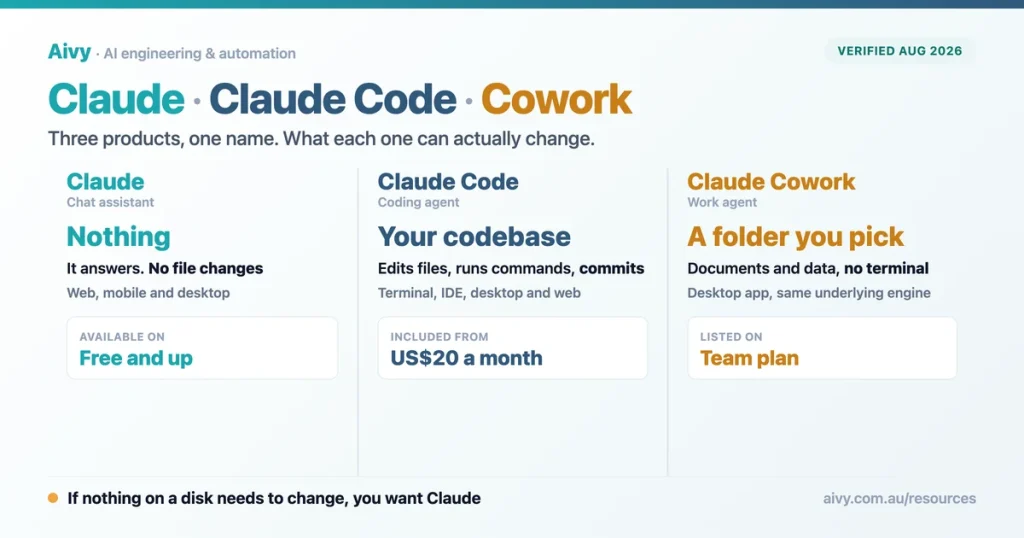
The most common question I get about Claude Code is not how to use it. It is what it actually is. People have used Claude in a browser tab, they have heard developers talk about Claude Code, and they reasonably assume it is a fancier version of the same thing. It is not. One of them answers questions. The other changes files on your computer, runs commands and commits the result. That gap matters before you pay for anything.
I run growth at Aivy, an AI automation agency in Melbourne, and I sit between the two audiences all day. The developers on our team live inside Claude Code. Clients ask whether their finance team needs it, which is almost always the wrong question. The honest answer depends on whether you want something to think alongside you, or something to do work on files while you watch it happen.
So this is the plain version, with no benchmark tables and no argument about which coding agent wins. What Claude Code is, what it does that the chat app cannot, which subscription includes it, why the words Claude Code and VS Code confuse search engines as much as they confuse people, and when plain Claude is the better tool. The Quick pick gives you the one line answer if that is all you came for.
What Claude Code actually is
Anthropic describes it as an agentic coding tool that reads your codebase, edits files, runs commands and integrates with your development tools. Strip the jargon and you get the useful version: it is Claude with hands. The chat app can tell you what to type. Claude Code types it, runs it, reads the error and tries again. That loop is the entire product, and it is the same distinction we draw between agentic AI and generative AI.
The practical consequence is that Claude Code needs somewhere to act. It runs where your work already lives: a terminal, an editor such as VS Code or a JetBrains IDE, a desktop app, a browser session, the Claude mobile app or Slack. All of those surfaces talk to the same engine, so your project instructions, settings and connected tools follow you between them rather than being set up again for each one.
Under the hood, Claude Code has run Claude Opus 5.5 by default on every plan since 22 September 2026, and Sonnet 5.5 joined on 28 September for lighter work. The wider line up today is Claude Opus 5.5 and Sonnet 5.5, OpenAI’s GPT 6 Astra and GPT 6.1 Sol, and Google’s Gemini 3.8 Flash and 3.1 Pro, but inside Claude Code you are choosing among Anthropic’s models only.
The search data says the confusion is real and widespread. When I pulled Australian search volumes for questions about Claude Code, the definitional question beat every practical how to question by a wide margin. For a developer tool that is unusual, and it tells you who is actually searching: people deciding whether this is for them at all.
What Australians actually ask about Claude Code
Monthly Australian search volume, questions containing “Claude Code”. Bars scaled to the largest. Source: Ahrefs Keywords Explorer, August 2026.
Claude, Claude Code and Cowork: two products now, not three
Until September Anthropic shipped three things with Claude in the name. Claude is the assistant you chat with. Claude Code is the agent that works on code. Cowork, the same kind of agent pointed at ordinary work files, became part of Claude itself on 16 September 2026, rolling out first on Pro and Max, so the real split is now Claude and Claude Code. Choosing between them is a different exercise from choosing which Claude model to use.
Cowork arrived in January 2026 because of something Anthropic noticed: subscribers were already using Claude Code for tasks that had nothing to do with code. It is built on the Claude Agent SDK, the same foundation as Claude Code, and it works on a folder you nominate. If you have been eyeing Claude Code for spreadsheet and document work, Cowork inside Claude is very probably what you wanted.
| Claude | Claude Code | Cowork, now inside Claude | |
|---|---|---|---|
| Who it is for | Anyone | Developers | Everyone else |
| Where it runs | Web, mobile, desktop | Terminal, VS Code, JetBrains, desktop, web, mobile, Slack | Web, desktop and mobile, on paid plans |
| What it can touch | Nothing on your machine | Your codebase and your shell | A folder you approve |
| Best at | Thinking, drafting, analysis | Building and shipping software | Documents, data, repeatable admin |
| Terminal required | No | No, but the terminal version is the complete one | No |
Worth saying plainly, because it saves money: if most of your team is not writing software, the product they need is probably not the one their technical colleague is recommending. We see that mistake often enough that it is now the first thing I check. It also changes how you compare Claude with the alternatives, which we cover in Claude versus ChatGPT.
The real difference: a chat window versus your terminal
Here is the cleanest way I have found to explain the boundary. In the chat app, the unit of work is a message. You ask, it answers, and nothing outside the conversation changes. In Claude Code, the unit of work is a task. You describe an outcome, it makes a plan, edits the files, runs the tests, reads what broke, fixes it, and then shows you what changed.
That is why the two interfaces look so different. A chat window only needs a text box. An agent needs permission prompts, a diff view and a way to undo. Most of what fills the Claude Code screen is not conversation at all, it is control: approving an edit, reviewing a plan before it runs, rewinding to an earlier state when a change went the wrong way. If you would rather that control lived inside an editor, Cursor and Claude Code take opposite approaches to it.
If nothing on a disk needs to change, you want Claude. If something does, you want Claude Code. Every other difference follows from that.
What Claude Code can do that Claude cannot
The list that matters is short, and every item on it involves touching something. It writes tests and runs them, fixes lint errors across a whole project, resolves merge conflicts, updates dependencies and drafts release notes. It works with git directly, so it stages the changes, writes the commit message, creates the branch and opens the pull request. Whether the code it produces is safe is a separate question, and we ranked which assistants produce the safest code.
Two capabilities reach further than most people expect. It connects to outside systems through the Model Context Protocol, so reading a design document in Google Drive or updating a ticket in Jira can be part of the same task. And it is composable in the Unix sense: you can pipe a log file into it from the command line and ask what looks wrong, which is a very different way of working from pasting text into a chat box.
The third capability changes how a business should think about all of this: it runs unattended. You can wire it into GitHub Actions to review pull requests, or schedule it in the cloud so a job runs whether or not your laptop is awake. That is the moment a coding assistant stops being a helper and becomes infrastructure, which is the territory our AI consulting and strategy work covers.
The three things a chat window cannot do
Capabilities listed in Anthropic’s Claude Code documentation, verified 10 August 2026.
Is Claude Code included in your Claude plan?
Yes, on any paid plan, and that surprises people who assume it is a separate purchase. Anthropic’s pricing page lists Claude Code as included on Pro, on both Max tiers, and on Team and Enterprise. The free plan is chat only. You can also sign in with an Anthropic Console account and pay API rates instead, which is the route for teams that want usage billing rather than seats.
| Plan | Price in Australia | Claude Code included |
|---|---|---|
| Free | $0 | No, chat only |
| Pro | $30 a month, or $349.99 a year | Yes |
| Max, 5x and 20x | $199.99 or $399.99 a month | Yes |
| Team | $35.10 a seat, or $28.08 annually | Yes |
| Enterprise | $28.08 a seat plus usage at API rates | Yes |
Pro and Max prices are the Australian ones in the Claude app on the App Store, GST included, read 1 October 2026. Team and Enterprise bill in US dollars; converted at the RBA rate of 22 September 2026. Usage limits apply on every plan.
The thing the table cannot show you is that this is unusually transparent for the category. Most vendors selling agent capability to Australian businesses put it behind a sales call, which is one reason we published what AI consulting really costs here. When a price list is this public, use it.
What Claude Code costs an Australian team
The sticker price is the easy part and it is lower than most people guess. The harder part is that every plan carries usage limits, and agent work burns through them faster than chatting does. A developer running long tasks with several agents at once will meet a weekly ceiling that the same person would never approach by asking questions in a chat window. Limits are shared with Claude, on five hour and weekly windows, and the five hour ones rose on 22 September.
Monthly cost per person on the plans that include Claude Code
Pro and Max: monthly plans in the Claude app on Australia’s App Store, GST included, read 1 October 2026. Team Standard bills in US dollars; converted at the RBA rate of 22 September 2026. Enterprise adds usage on top, so it is not shown.
Two practical notes for Australian buyers. The App Store prices above are set in Australian dollars; if you subscribe on the web, check the currency at checkout, because Anthropic only prices in local currency where it supports one. And the per seat arithmetic changes at Team, at $35.10 a seat a month, or $28.08 billed annually, which matters a great deal to the Melbourne businesses we work with whose non developers also want an agent.
If you are trying to work out whether any of this pays for itself, the honest method is to price the hours you expect to recover rather than the licence. Our AI ROI calculator does that arithmetic in a couple of minutes, and it is the same model we use when we scope a pilot.
Claude Code inside VS Code: why that search misleads
This one causes more confusion than anything else on the page, and search engines make it worse. Type Claude Code vs Code and you get two completely different intentions mixed together: people comparing Claude Code with a rival tool, and people looking for the VS Code extension. They are not the same question, and the second group is larger than you would guess.
So to be clear about what exists: there is an official Claude Code extension for VS Code, and it installs in VS Code forks such as Cursor and Devin Desktop too. It gives you inline diffs, references to specific files and line ranges, plan review before anything runs, and your conversation history inside the editor. It needs VS Code 1.94 or higher and any paid Claude subscription. If you are choosing an editor rather than an agent, Cursor and GitHub Copilot is the more useful comparison.
One catch is worth knowing before you install it. The extension bundles its own copy of the command line tool for the chat panel, but it does not add claude to your shell path. If you want to type claude in the integrated terminal, you install the standalone tool as well. A few features stay in the terminal only, and the table below is the honest version of what you give up.
| Feature | Terminal tool | VS Code extension |
|---|---|---|
| Commands and skills | All of them | A subset |
| Connecting outside tools | Yes | Yes, with /mcp in the chat panel |
| Rewind to an earlier state | Yes | Yes |
| Shell command shortcut | Yes | No |
| Tab completion | Yes | No |
From Anthropic’s VS Code documentation, verified 10 August 2026.
Do you need to be a developer to use it?
Mostly yes, and I would rather say so plainly than sell you something. Claude Code assumes you are comfortable with a project folder, a terminal or an editor, and the habit of reviewing a change before you accept it. None of that needs a computer science degree, but all of it needs a willingness to work inside a developer’s environment. The alternative, people quietly using whichever tool is already open, is the shadow AI problem.
If that is not you, the honest answer is Claude itself, now with Cowork built in, not a weekend spent learning shell commands. Anthropic built Cowork for exactly the people who wanted agent behaviour without the setup. I have watched capable, senior, entirely non technical people get further in one afternoon with Cowork than in a week of fighting a terminal, and there is no prize for taking the hard route.
There is a middle path worth naming, because it is where the value usually turns up. The people who get the most out of Claude Code in the companies we work with are not always developers by job title. They are the operations and finance people who already automate things, already think in steps, and are not frightened of a configuration file. We see it most in professional services firms, where one such person quietly changes how a whole team works.
Who actually gets value out of Claude Code
The middle group is the one people forget: operations and finance staff who already automate get further with this than some developers do.
How to install Claude Code on macOS, Windows or Linux
Installation is a single command on every platform, which is a low bar that Anthropic clears. On macOS, Linux or WSL you pipe the official installer into bash. On Windows there is one command for PowerShell and a different one for the old command prompt. Homebrew and WinGet both carry it, and there are apt, dnf and apk packages for Debian, Fedora, RHEL and Alpine.
Two details save time. On native Windows, install Git for Windows as well, because without it Claude Code falls back to PowerShell for shell commands. And the way you install decides how you get updates: the native installer updates itself in the background, while Homebrew and WinGet installations do not, so you upgrade those yourself when you remember to.
Then you point it at a project folder and start it, and that is genuinely the whole setup. If you hit an error at this stage it is almost always the wrong shell, because the PowerShell and command prompt versions are not interchangeable. Access from this side of the world is not the obstacle people expect either, as we set out in can Australians use Claude.
Installing it, by platform
From Anthropic’s install documentation. The native installer updates itself in the background; Homebrew and WinGet installations do not, which is the detail that bites six months later.
When plain Claude is the better choice
I use the chat app far more than Claude Code, and I think that is the right ratio for most people. Anything where the output is thinking rather than a file belongs in a chat window: pressure testing an idea, drafting a difficult message, reading a contract, working through a decision with someone. Handing that to an agent adds ceremony without adding anything useful.
There is a governance reason to keep some work in chat, and it applies to every Australian business, not only the regulated ones. The OAIC recommends that organisations do not enter personal information, and particularly sensitive information, into publicly available AI products. An agent with folder access makes it easier to send more than you meant to, because you approve a task rather than a payload. We cover the onshore question in which AI tools keep your data in Australia.
So the split we recommend to clients is boring and it works. Chat for judgement, agents for labour, and one written rule about which data may go into either. If you have not written that rule yet it is a smaller job than it sounds, and our AI policy template is a reasonable starting point.
Three questions that settle it
Our own rule of thumb from client work, not a vendor claim.
Where Claude Code sits against Codex and Cursor
This is the question everybody arrives at eventually, and it deserves its own article rather than a paragraph at the end of this one. The short version: Claude Code, OpenAI’s Codex and Cursor are the three tools most Australian teams end up choosing between, and they are different shapes. Claude Code and Codex are agents you drive. Cursor is an editor with an agent living inside it, which is why our ranked overview of the whole field treats them separately.
I am not going to settle it in a definitional guide, because the answer moves with every model release and depends heavily on what your team already uses. If the choice you actually face is between the two agents, read our direct comparison of Claude Code and Codex instead of this page.
And if the question you actually have is the same one about the other tool, we wrote what Codex is inside ChatGPT as the sibling to this page. Same shape, same plain explanation, different vendor.
Two shapes, not three products
Which one wins on benchmarks moves with every model release, so that comparison lives in the linked guides and is kept current there.
Frequently asked questions about Claude Code
What is Claude Code in simple terms?
Claude Code is Claude with the ability to act on your files. It reads a codebase, edits files, runs commands and commits the result, rather than only answering questions in a chat window. Anthropic describes it as an agentic coding tool.
Is Claude Code the same as Claude?
No, though one paid plan covers both, with the same models and shared usage limits. Claude is the chat assistant you use in a browser or an app. Claude Code is a separate agent that works on files and runs commands on a machine you have given it access to.
What is claude.ai/code?
It is Claude Code on the web: cloud sessions that run in your browser, or in the Code tab of the Claude mobile app, with no local setup. It is available on Pro, Max and Team, and on Enterprise seats that include Claude Code.
Is Claude Code included in Claude Pro?
Yes. Anthropic’s pricing page lists Claude Code as included on Pro, on both Max tiers, and on Team and Enterprise. Only the free plan leaves it out. Usage limits apply on every plan, and agent tasks consume them faster than chat does. Lowering the effort setting in Claude Code stretches them further.
Do you need to know how to code to use Claude Code?
Typically yes, at least enough to work inside a project folder and review a change before accepting it. If you want agent behaviour without a developer setup, Cowork, now built into Claude on paid plans, is made for that and needs no terminal.
What is the difference between Claude Code and Claude Cowork?
Both are agents on the same foundation, but they point at different work. Claude Code works on codebases from a terminal or an editor. Cowork works on documents and data you approve and, since 16 September 2026, is part of Claude itself on the web, desktop and mobile.
Does Claude Code work in VS Code?
Yes. An official extension adds inline diffs, file references, plan review and conversation history to the editor. It needs VS Code 1.94 or higher and a paid Claude subscription, and it also installs in forks such as Cursor and Devin Desktop.
Do you need the terminal to use Claude Code?
No, although the terminal version is the most complete one. Claude Code also runs as a VS Code or JetBrains extension, as a desktop app, in a browser, in the Claude mobile app and in Slack, and they share the same settings and project instructions.
Does Claude Code use your code to train models?
It depends on the plan. On Team, Enterprise and the API, Anthropic does not train on your code. On Free, Pro and Max it can be used for training if your data sharing setting is on, so check that setting before you point it at client work.
Is Claude Code safe to point at client code?
That depends on your obligations rather than the tool alone. The OAIC recommends organisations do not enter personal information into publicly available AI products, so agree what may go into an agent first. Our Privacy Act compliance playbook covers the detail.
The bottom line for Australian teams weighing Claude Code
If you take one thing from this, take the boundary rather than the feature list. Claude answers. Claude Code acts. Every other difference, the terminal, the permission prompts, the diff view, even the plans, follows from that single fact. Once you see it that way the question stops being which one is better, and becomes which job you have in front of you today.
The pattern I see most often in Melbourne is a team about to buy the wrong product. Someone technical recommends Claude Code, most of the team cannot use it, and the subscription gets blamed for a mismatch that was really a question nobody asked. Work out how many of your people will genuinely work on files in a terminal before you count seats, because the answer is usually two or three.
We are Aivy, and we work with Australian businesses on exactly this sort of decision, including the times when the answer is that you need less than you thought. If you want to talk it through, book a discovery session and bring your real workflows rather than a shortlist. That conversation is usually shorter and cheaper than the pilot you were about to run, and you can see the rest of our AI solutions for Australian businesses if you would rather read first.
Last updated: 1 October 2026. Prices, plan inclusions and product details verified against Anthropic’s public pages on that date.
Sources
Claude Code documentation, Anthropic: the product definition quoted above, the five surfaces it runs on, and the install commands for macOS, Windows, Linux, Homebrew, WinGet and the Linux package managers.
Claude plans and pricing, Anthropic: which plans include Claude Code, and the note that usage limits apply.
Claude in the Australian App Store: the Pro and Max prices in Australian dollars used in the table and the cost chart, read 1 October 2026.
Cowork is now Claude, Anthropic: Cowork folded into Claude on 16 September 2026, rolling out first on Pro and Max.
Claude Code model configuration, Anthropic: Opus 5.5 as the default model, with Sonnet 5.5 available.
Claude Code data usage, Anthropic: which plans may use your code for training and which do not.
Claude Code in VS Code, Anthropic: the VS Code 1.94 requirement, the fact that the extension does not add claude to your shell path, and the terminal only features.
TechCrunch, 12 January 2026: the launch of Claude Cowork, its foundation on the Claude Agent SDK, and why Anthropic built it for people using Claude Code on work that was not code.
OAIC guidance on commercially available AI products: the recommendation that organisations do not enter personal information, and particularly sensitive information, into publicly available AI products.
Homebrew package index, the Claude Code cask: independent confirmation that Homebrew carries Claude Code, and the install command referenced in the setup section.
Ahrefs Keywords Explorer: the Australian monthly search volumes charted above, pulled for the Australian market in August 2026.