Every week I sit in meetings where a small robot joins, announces itself, and quietly writes better minutes than any human in the room. AI note takers went from novelty to default in about eighteen months. The category is now crowded, the free plans are generous, and most of the reviews you will find rank the same eight tools on the same four features. It is the same pattern we saw with customer service chatbots: plenty of lists, almost no local detail.
What those reviews skip is the part that matters if you run a business here. I work at Aivy, an AI automation agency in Melbourne, and the first question our clients ask is never about summary quality.
It is some version of: are we allowed to record this, and where does the recording end up? Those two questions knock out more shortlist candidates than any feature comparison, and they are the same ones that decide most professional services rollouts.
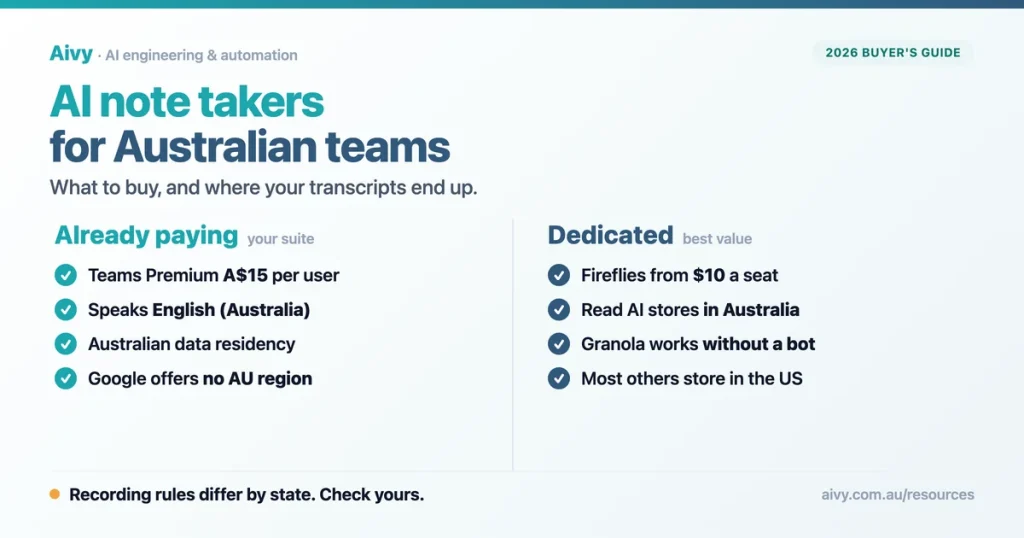
So this guide covers both. The tools, their real prices and their honest limits, and then the Australian layer: which states let you record a meeting you are part of, which do not, and which vendors will keep your transcripts onshore. Here is the short version before the detail.
The AI note taker you already pay for
Most mid sized Australian businesses already own an AI note taker and have not turned it on. Before you add another subscription, check the suite you are already licensed for. In a lot of cases the answer is that you need nothing else, which is the first thing we look at in any AI solutions review.
Microsoft is the strongest of the three here, and not because of features. Teams live transcription supports English (Australia) as a distinct language variant, and Microsoft lists Australia among the countries covered by its data residency commitments for Copilot. Neither Google nor the dedicated tools can say both of those things. If you are weighing the wider suites against each other, our comparison of ChatGPT Business, Claude Team and Copilot goes deeper.
The catch is licensing. The richer recap features sit behind Teams Premium or Microsoft 365 Copilot, which are paid add ons on top of your existing plan. Google puts its note taking behind Business Standard and above, so Starter customers do not get it at all. Field businesses meet the same licensing question from another angle, and transcription on a job site rather than in a meeting shows which vendors ship it as standard.
| Suite | What it costs in Australia | Australian data region |
|---|---|---|
| Teams Premium | $15.00 per user a month, paid yearly, excluding GST | Yes |
| Microsoft 365 Copilot | $31.40 per user a month, paid yearly, excluding GST | Yes, for data at rest |
| Google Workspace Business Standard | $19.80 per user a month, billed monthly | No. Only the US or Europe |
| Zoom Workplace Pro | $21.66 per user a month, billed annually, excluding GST | Partly, via hosting options |
Dedicated AI meeting assistants worth shortlisting
Dedicated tools still win on summary quality, search across past meetings and CRM integrations, in the same way a purpose built AI chatbot beats a generic assistant on support. They also tend to be cheaper per seat than a Copilot licence. The trade off is that almost all of them store your data offshore.
Fireflies is the one I point Australian clients to first, for a reason that sounds small and is not: it is the only tool here that supports English (Australia) as a named variant, and it handles more than 60 languages inside a single conversation. Otter, by contrast, publishes a list of accents it handles well, and Australian is not on it. Model choice matters more than vendors admit, as our guide to which Claude model to use sets out.
Otter also carries two limits that quietly disqualify it for a growing team. Its Business plan caps at 25 billed users, and single sign on requires a minimum 100 user licence. There is no tier in between, which is an awkward place to be at 40 staff.
| Tool | Entry paid plan (billed annually) | Joins as a bot? | Where data lives |
|---|---|---|---|
| Fireflies | $14 per seat a month | Yes, always visible | United States |
| Granola | $20 per user a month | No bot by design | United States |
| Fathom Team | $21 per user a month | Optional, bot free is Mac beta | United States |
| Read AI Pro | $21 per user a month | Yes, with desktop alternative | US default, Australia available |
| tl;dv Pro | $26 per seat a month | Yes, with desktop alternative | European Union |
| Otter Business | $28.39 per user a month | Yes, cannot be hidden | United States |
What an AI note taker costs a team of 20
Per seat pricing hides the real number. Multiply by headcount and a year, and the gap between the cheapest and the dearest option on this list is roughly a junior salary’s worth of software over three years. A quick AI business audit usually finds two or three of these already on the card.
Annual cost for 20 seats, billed annually
Excluding tax. Calculated from each vendor’s published annual per seat rate, converted at 1 USD = 1.42 AUD, 11 August 2026. Source: vendor pricing pages, August 2026.
Two things to note before you take those numbers to a budget meeting. All of them exclude GST, and the vendors bill in US dollars, so your actual invoice moves with the exchange rate. And every one of these vendors charges materially more if you pay monthly instead of annually, in some cases double. Clinic software has the same catch: Cliniko bills in US dollars while its Australian rivals quote locally, which moves the real cost per practitioner.
If you want to put those numbers against the hours they save, our AI ROI calculator does the arithmetic.
Recording meetings in Australia: the state rules
This is the section that global buying guides do not have, and it is the one that has stopped rollouts I have worked on. There is no single federal law on recording a private conversation. Each state and territory has its own, and they split into two camps. The federal layer sits on top, and we cover it in the Privacy Act compliance playbook.
In Victoria, Queensland and the Northern Territory, the listening device laws only prohibit recording a private conversation you are not part of. In New South Wales, Western Australia, South Australia, Tasmania and the ACT, recording a conversation you are part of is also covered, subject to exceptions.
The penalties are not trivial. In New South Wales the maximum for a corporation is 500 penalty units. In South Australia it is $75,000 for a body corporate, and in Western Australia $50,000. Queensland tops out at 40 penalty units or two years imprisonment.
| Jurisdiction | Recording a meeting you are in | Governing Act |
|---|---|---|
| Victoria | Not prohibited by the listening device offence | Surveillance Devices Act 1999 |
| Queensland | Not prohibited, but publishing it is restricted | Invasion of Privacy Act 1971 |
| Northern Territory | Not prohibited by the listening device offence | Surveillance Devices Act |
| New South Wales | Covered, exceptions in s 7(3) | Surveillance Devices Act 2007 |
| South Australia | Covered, exceptions in s 4(2)(a) | Surveillance Devices Act 2016 |
| Western Australia | Covered, narrow exceptions | Surveillance Devices Act 1998 |
| Tasmania | Covered, exceptions apply | Listening Devices Act 1991 |
| ACT | Covered, exceptions apply | Listening Devices Act 1992 |
Now the awkward part. Your Tuesday standup has someone in Sydney, someone in Brisbane and someone dialling in from Perth. None of these Acts contains a rule that settles which one governs that call. In practice the safe assumption is the strictest state on the invite, which is why most policies I help write simply require consent from everyone, everywhere. In healthcare and medical practices that rule is not optional, because the content is sensitive by default.
The practical rule. Announce the recording at the start, get an audible or written yes, and keep the bot visible. It costs you fifteen seconds and it makes the state by state question mostly go away.
Where your meeting transcripts actually live
A meeting transcript is personal information under the Privacy Act 1988, which brings APP 5 notification duties with it. If your meetings touch health, finances or anything else that counts as sensitive information, the OAIC’s position is that you need consent, and it has flagged the difficulty directly: you cannot always predict what will come up in a meeting.
That makes data location a live question rather than a procurement checkbox. Of the dedicated tools, only Read AI offers an Australian deployment. tl;dv keeps everything in the European Union. Fireflies, Fathom, Granola and Otter all default to the United States.
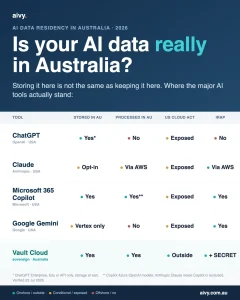
Google is the surprise here. Its data regions policy offers the United States or Europe only, so an Australian Workspace customer cannot pin Meet recordings, transcripts or Gemini prompts to Australia. Microsoft can, and that gap is the single clearest technical difference between the two suites for a compliance minded buyer. If you also sell into Europe, the EU AI Act checklist adds a second layer to check. We went deeper on this in our guide to which AI tools keep your data in Australia.
Suite pricing in Australia, per user a month
List price, excluding GST where the vendor states it. Source: Microsoft, Google and Zoom Australian pricing pages, August 2026.
Meeting bots versus bot free note taking
There are two architectures and the choice has consequences. Bot based tools send a participant into the call. Device based tools capture the audio on the laptop instead, so nothing joins and nobody sees an extra tile.
Granola and Supernormal have no bot at all by design, much like an AI medical scribe that listens in the room rather than joining a call. Fathom, Read AI and tl;dv give you both options. Otter does not: its own documentation answers the question flatly, saying the notetaker will always join as a guest participant and cannot join anonymously.
My honest view is that in Australia the visible bot is a feature, not a bug. It is a standing, obvious notice that recording is happening, which is exactly what the state laws and APP 5 are pushing you towards. A device level recorder that captures your colleagues silently is the version most likely to cause a problem later, and in accounting and advisory work that risk lands on client conversations.
Before you roll out an AI meeting assistant
Rolling one of these out is not a procurement decision, it is a policy decision. The tool is the easy part. What follows is the checklist I use with clients, and most of it has nothing to do with features.
Decide who may switch it on, and for which meeting types. Performance conversations, disciplinary meetings and anything with legal or health content should usually be excluded outright, the same carve out we build into AI automation projects in Melbourne. Write that down before the first licence is bought, not after the first incident.
Then decide how long transcripts live. Retention defaults are generous because storage sells seats, not because holding two years of every conversation is good for you. If your team is already pasting confidential material into tools nobody approved, our guide on shadow AI is the better place to start.
Five questions for the vendor.
Where is our data stored, by country? Do you use our recordings to train models? What is the shortest retention period you support? Can we get single sign on at our seat count? What happens to our transcripts if we cancel?
Choosing your AI note taker in five minutes
If you are already paying for Microsoft 365 and data location is a board level concern, buy Teams Premium and stop reading. It is $15 a user, it speaks Australian English, and Microsoft will commit to keeping the data here.
If you want the best summaries per dollar and offshore storage is acceptable, Fireflies at $14 a seat annually is the value pick, and it is the only one with a real Australian English setting. If storage must be in Australia and you want a dedicated tool, Read AI is currently the only option that offers it.
If your meetings are mostly in person or you hate the extra participant, Granola is the cleanest bot free experience. And if the shortlist itself is the problem, our honest guide to choosing an agency applies just as well to choosing tools.
And if you are trying to work out how any of this fits a wider automation plan, that is the sort of thing our AI consulting work exists for.
| If you | Choose | Why |
|---|---|---|
| Run on Microsoft 365 | Teams Premium | Australian data region and en-AU transcription |
| Want the cheapest capable seat | Fireflies | $14 a seat annually, English (Australia) supported |
| Must keep data onshore | Read AI or Teams Premium | The only two here offering Australian storage |
| Meet in person a lot | Granola | Captures device audio, no bot joins |
| Need EU data residency | tl;dv | Hosted and stored in the European Union |
Frequently asked questions
What is the best AI note taker for a small Australian team?
For most small Australian teams, Fireflies at $14 a seat billed annually offers the best balance of price and capability, and it is the only tool reviewed here with an English (Australia) setting. If you already pay for Microsoft 365, Teams Premium is usually the cheaper path, and our suite comparison shows what else that licence covers.
Is it legal to record a meeting in Australia?
It depends on your state. Victoria, Queensland and the Northern Territory do not prohibit recording a private conversation you are part of, while New South Wales, Western Australia, South Australia, Tasmania and the ACT do, subject to exceptions. Getting consent from everyone avoids the question.
Do I need consent from everyone in the meeting?
Not in every state, but it is the safest approach and often the practical one. Online meetings frequently span several states, and none of the Acts sets a rule for which jurisdiction governs a multi state call.
Are AI note takers free?
Most have a free tier, though the limits bite quickly. Otter caps free users at 300 minutes a month and 30 minutes per conversation, while Fireflies gives unlimited transcription but only 400 minutes of storage across the whole team.
Which AI note taker stores data in Australia?
Read AI is the only dedicated tool here that offers an Australian deployment, and Microsoft commits to Australian data residency for Copilot. Google Workspace does not offer an Australian data region at all, only the United States or Europe. We list the rest in which AI tools keep your data in Australia.
Can an AI note taker record without joining the meeting?
Yes, several capture audio at the device instead. Granola and Supernormal work this way by design, and Fathom, Read AI and tl;dv offer a desktop app as an alternative to the bot. Otter always joins as a visible participant.
Is a meeting transcript personal information under the Privacy Act?
Generally yes, which brings notification duties under APP 5. If the discussion captures sensitive information such as health details, the OAIC’s guidance indicates you will also need consent from participants.
Do AI note takers handle Australian accents well?
Support varies more than vendors admit. Fireflies lists English (Australia) as a named variant and Microsoft Teams supports it in live transcription, while Otter’s published list of well handled accents does not include Australian.
The bottom line on AI note takers in 2026
The tools have converged. Summary quality is no longer the thing that separates them, which means your decision comes down to two questions that are specific to operating here: where the data sits, and whether you are allowed to press record in the first place.
A Melbourne professional services client of ours ran a three week trial across two tools before anyone read the recording rules. They had staff in four states, no consent script, and a retention default of forever. Nothing went wrong, but the policy work they should have done first took longer than the trial did.
Do it the other way around. Write the one page policy, pick the state rule you will apply to everyone, then choose the tool. The free AI readiness assessment is a reasonable place to start that conversation internally.
If you would rather have someone sanity check the plan before you sign anything, we are Aivy, an AI and automation team working with Australian businesses, and you can book a discovery call.
Last updated: 11 August 2026
• Otter.ai pricing · Pro and Business rates, the 300 minute free cap, the 25 billed user ceiling and the 100 user minimum for single sign on
• Fireflies pricing · $14 and $27 annual seat rates, the 400 minute team storage cap on the free plan and English (Australia) support
• Fathom help centre · supported languages and United States only data storage
• Google Workspace Australian pricing · $9.90, $19.80 and $30.90 list rates, the 300 user cap and Gemini availability by edition
• Microsoft Teams AI features documentation · licence requirements, English (Australia) transcription and recap limits
• OAIC guidance on commercially available AI products · consent where sensitive information is collected and the meeting minutes example
• Surveillance Devices Act 2007 (NSW) · section 7 offence, the section 7(3) exceptions and the 500 penalty unit corporate maximum